Your workflow may be working harder than you are
Think about the last time you completed a task that should have taken ten minutes but somehow consumed half an hour.
Nothing necessarily went wrong. The software opened. The data existed. The people involved were available. The process was technically functional.
Yet you had to search for the right document, switch between applications, copy information from one system into another, remember which version was current, wait for someone to respond, and then retrace your steps because one small detail was missing.
That is workflow friction.
It is the resistance between knowing what needs to happen and getting it done.
The most expensive workflow problem is often the one nobody thinks is broken.
What Is Workflow Friction?
Workflow friction is the cumulative resistance that makes a task, process or workflow harder to complete than it needs to be.
That resistance can come from software, process design, communication, unnecessary decisions, repeated data entry, unclear ownership, excessive approvals, context switching, missing information or tools that don't work well together.
Importantly, workflow friction does not necessarily mean that something is broken.
A workflow can be completely functional and still be clunky.
A bottleneck restricts flow at a particular point. Workflow friction is broader: it describes the resistance distributed across the entire journey.
A simple example
Imagine a developer fixing a small production issue.
The actual code change might take five minutes. But before the developer can make it, they have to find the relevant ticket, locate the correct repository, discover which environment is affected, ask where the latest logs are stored, switch to a monitoring tool, authenticate again, find the deployment history, and then work out which notification contains the original context.
The five-minute coding task wasn't the workflow. Everything surrounding it was part of the workflow too.
Why Workflow Friction Matters
Most workflow friction is too small to trigger a project, a budget request or a meeting. That is exactly why it is so easy to underestimate.
A developer waits for a build. Someone searches through three tools for the latest document. A designer exports a file because two systems don't talk to each other. A manager copies information from one spreadsheet into another.
None of these moments feels catastrophic. Work continues. The problem is that they repeat.
Workflow friction is usually measured in seconds and minutes, but experienced in attention, interruptions, uncertainty and lost momentum.
"How much time did this task take?"
Ask instead:"How much unnecessary effort did the system require while I was doing it?"
Small friction compounds
Imagine a team encounters just five unnecessary interruptions during an average working day. Each one takes only three minutes to resolve.
This is an illustrative example, not a claim about average workplace productivity. The point is how repeated small interruptions accumulate.
The 5 Types of Workflow Friction
Not every inefficient workflow has the same cause. Identifying the type of friction is the first step toward removing it.
Tool Friction
The software itself makes work harder than it needs to be: awkward interfaces, excessive clicks, slow systems, poor integrations or confusing workflows.
Example: You need information from four applications to complete one simple task.
Process Friction
The workflow contains unnecessary approvals, handoffs, duplication or manual steps.
Example: A request needs three approvals even though only one person can actually change the outcome.
Context Friction
People lose time rebuilding the context they need to continue their work.
Example: You return to a task after a meeting and spend ten minutes figuring out where you left off.
Decision Friction
Work slows because people have too many choices, unclear rules or insufficient information.
Example: Nobody knows which of five similar tools is the approved one for a particular job.
Coordination Friction
Progress depends on people, teams or systems being synchronised at the right moment.
Example: A developer cannot continue until another team manually provides information.
Think about the last task that felt unnecessarily difficult. Which of these five types best describes what went wrong?
The Workflow Friction Iceberg™
The friction people notice is often only the visible part. Beneath the obvious delays, errors and complaints sits a much larger layer of hidden work.
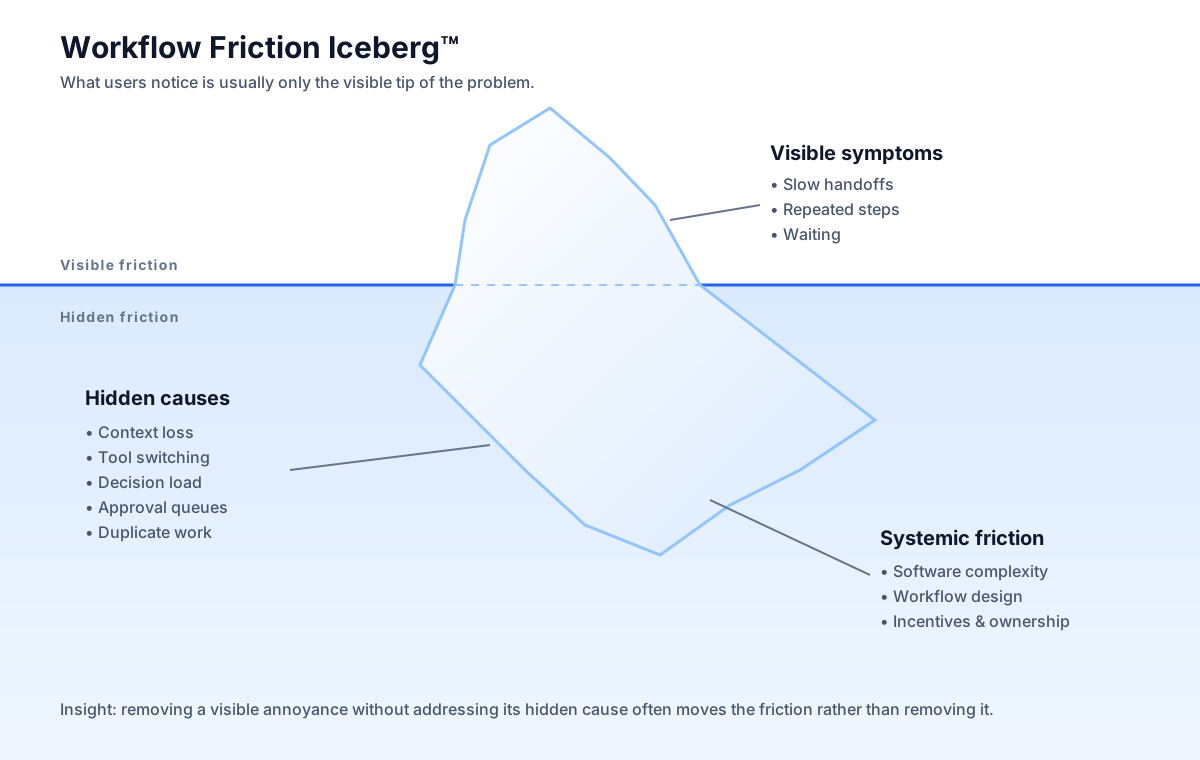
Above the surface
These are the problems people can easily see: errors, delays, complaints, extra clicks, failed handoffs and repeated corrections.
Below the surface
Hidden friction includes searching, remembering, checking, switching, waiting, re-entering information and rebuilding context.
Why it matters
A workflow can appear healthy while quietly consuming significant amounts of human attention through small, repeated acts of compensation.
Instead, people create workarounds. Then the workaround becomes part of the process. Eventually nobody remembers that the workaround was never supposed to be necessary.
The Workflow Friction Pyramid™
Not all friction deserves the same intervention. The best sequence is to remove unnecessary work first, simplify what remains, automate repetition, and only then optimise speed.
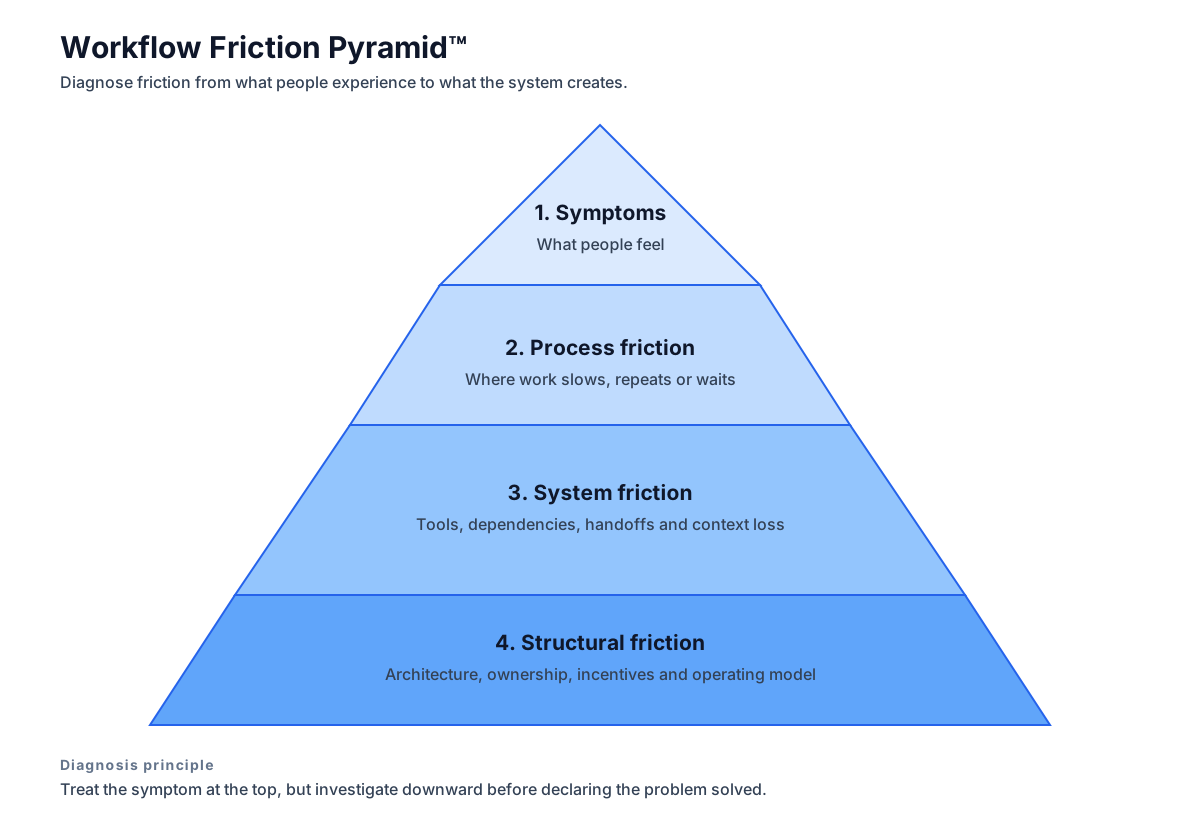
Eliminate
Ask whether the step needs to exist at all. Removing unnecessary work usually produces the largest reduction in friction.
Simplify
If the work is necessary, reduce the number of decisions, handoffs, fields, approvals or steps required to complete it.
Automate
Automate repetitive work once the underlying process is sensible enough to automate.
Optimise
Only after the previous layers have been addressed should you focus on making the remaining work faster.
Automating a bad process doesn't remove the friction. It can simply make the bad process happen faster.
The Friction Loop™
Workflow friction becomes especially dangerous when people adapt around it instead of removing its cause.
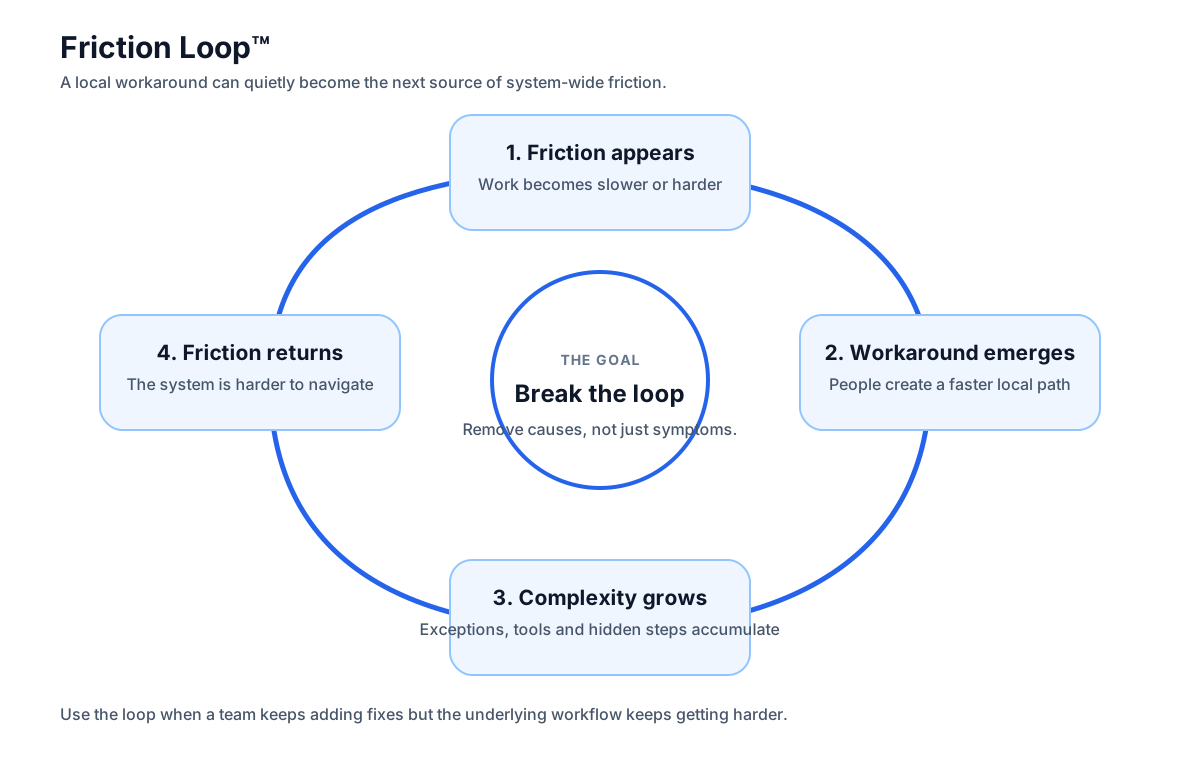
1. Friction appears
A tool, process or handoff creates unnecessary effort.
2. A workaround emerges
People naturally invent a way to keep moving when the intended workflow gets in their way.
3. Adaptation becomes normal
The workaround gets documented, taught and repeated until it feels like part of the official process.
4. Complexity accumulates
Each workaround adds another rule, tool, dependency or mental burden to the system.
Don't optimise the workaround. Find the friction that created it.
When a workaround has become normal, ask a deceptively simple question: what would have to change for this workaround to disappear?
If a workaround is performed repeatedly, treat it as evidence of a workflow problem rather than as an individual productivity problem.
Where Does Your Friction Come From?
Pick the statements that sound familiar. You don't need perfect data. Start with what you already notice.
What's Your Workflow Friction Score™?
Rate your workflow from 1 to 5 across five friction sources. Your score is a diagnostic signal, not a scientific benchmark.
This score is intentionally simple. Its purpose is to help you notice patterns and start a conversation, not to produce a universal productivity benchmark.
How to Reduce Workflow Friction
Don't try to redesign everything at once. Find the repeated points of resistance and remove them in order of impact.
Watch the work
Don't start with software. Start with the actual workflow. Follow a task from beginning to end and record every handoff, wait, search, copy, decision and interruption.
Find the repeated friction
One awkward step might be annoying. A step repeated hundreds of times is a system problem.
Remove before you automate
Question unnecessary approvals, duplicate data entry, redundant reports and unnecessary handoffs before adding automation.
Reduce context switching
Keep the information, tools and decisions needed for a task as close together as practical.
Make the next action obvious
Good workflows reduce the amount of thinking required just to figure out what happens next.
Measure the friction again
After changing the workflow, check whether the work actually became easier. Removing one visible annoyance can sometimes create friction somewhere else.
The Friction Reduction Framework
When a workflow feels clunky, move through these questions in order.
| Question | Look for | Possible action |
|---|---|---|
| Does this step need to exist? | Redundant work | Eliminate |
| Can the step be simpler? | Unnecessary complexity | Simplify |
| Does a person need to do it? | Repetitive manual work | Automate |
| Does the user have the required context? | Searching and rebuilding context | Bring context closer |
| Does the next action feel obvious? | Decision uncertainty | Clarify the workflow |
| Does someone have to wait? | Handoffs and dependencies | Reduce coordination cost |
Workflow Friction Audit Checklist
Use this checklist to identify unnecessary steps, tool switching, hidden work, context loss and coordination problems in your own workflow.
- Identify repeated manual steps
- Map every tool involved in a task
- Record every handoff and waiting point
- Find duplicate data entry
- Identify context switching
- Question inherited workarounds
- Look for unnecessary approvals
- Score the resulting friction
Workflow Friction FAQ
What is workflow friction?
Workflow friction is the unnecessary effort, delay, uncertainty or interruption involved in completing work. It can come from software, processes, people, decisions or the way information moves through a workflow.
What is software workflow friction?
Software workflow friction occurs when the tools used to complete a task introduce unnecessary steps, switching, searching, data entry, waiting or uncertainty.
How can you reduce workflow friction?
Start by observing the workflow and identifying repeated sources of resistance. Remove unnecessary steps first, simplify what remains, automate repetitive work and reduce unnecessary context switching and handoffs.
What causes workflow friction?
Common causes include excessive tools, fragmented information, manual data entry, unclear processes, unnecessary approvals, poor integrations, context switching, waiting for other people and workarounds created around limitations in software.
How is workflow friction different from inefficiency?
Inefficiency describes work that consumes more resources than necessary. Workflow friction focuses on the points of resistance that make work harder, slower or more disruptive. Friction is often one of the causes of inefficiency.
Why does software become clunky?
Software can become clunky as features, integrations, permissions and workflows accumulate over time. A system that solved one problem effectively can become harder to use as new requirements are added without simplifying what was already there.
Your workflow probably isn't broken. It might just be carrying too much friction.
Start by finding the small points of resistance that repeat. Then remove them one by one.